
Version 3.7 Release
What’s New
Smarter rebate management. Powerful projections. Stronger security.
Version 3.7 is one of the most substantial updates to the eBiz platform since v3. This document highlights the key features designed to help merchants take control of their rebate earnings, forecast spend with confidence, and streamline day-to-day operations.
- See every future rebate at a glance with the new Rebate Calendar
- Forecast spend and earnings using intelligent, season-aware projections
- Reconcile supplier data effortlessly with turnover stream categorisation*
- Spot threats to your rebate bands and opportunities to earn more
- Generate any report you need with flexible tag-based filtering
- Keep sensitive deal information secure with granular news controls
Finance & Rebate Management
Version 3.7 transforms how merchants interact with their rebate data — giving you visibility, accuracy, and forward-looking intelligence that was never possible before.
Rebate Calendar
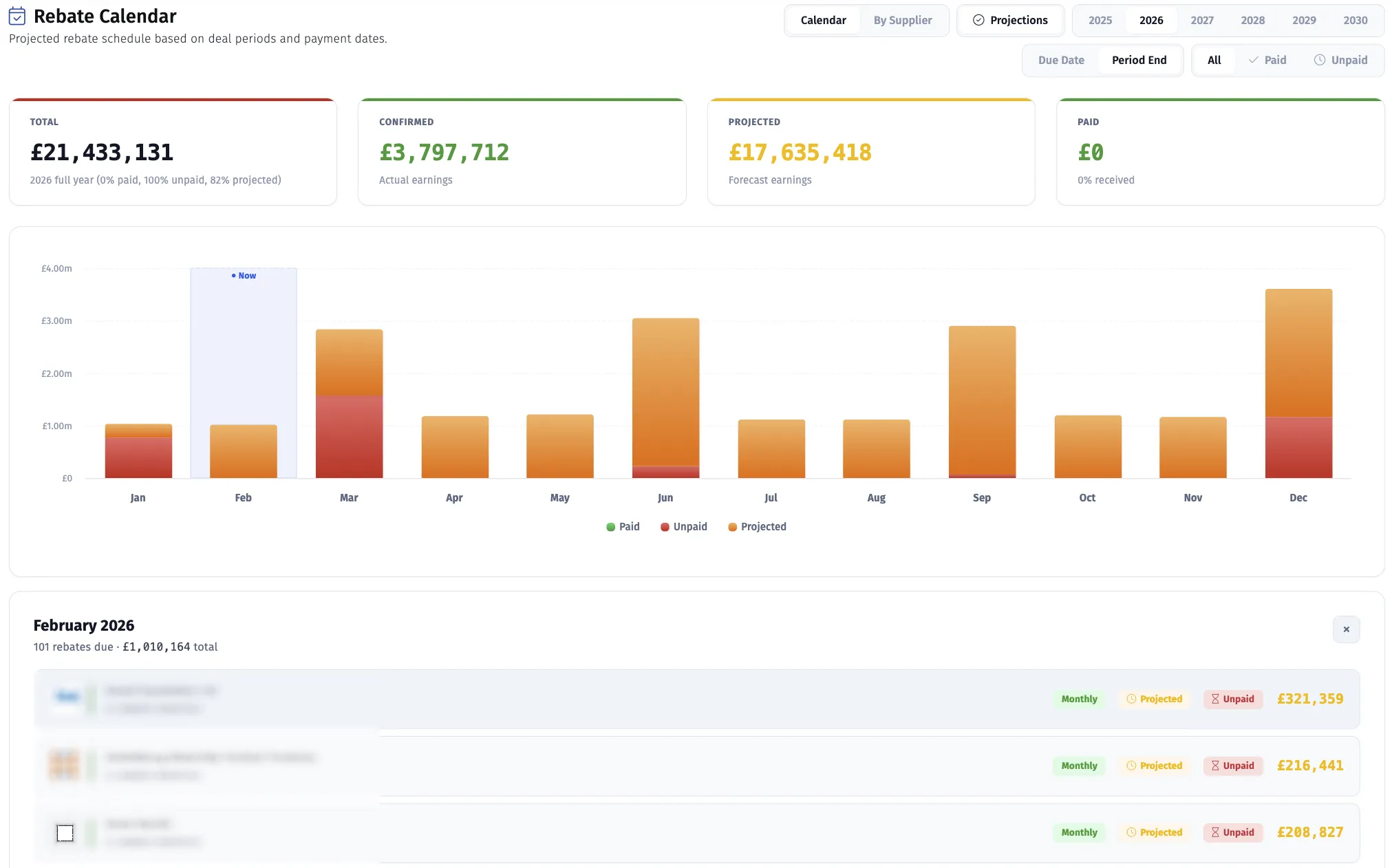
Stop wondering when rebates are due. The new Rebate Calendar gives you a clear, visual month-by-month view of every upcoming rebate — complete with projected values.
- See all upcoming rebates at a glance — monthly, quarterly, and annual
- Projected amounts are calculated automatically using seasonal trends and category growth
- Plan cash flow and budgets with confidence, months in advance
Rebate Report Builder
Build the exact rebate report you need. Slice data by supplier, merchant, category, or rebate type (monthly, quarterly, annual). Choose whether to view amounts earned, projected, or paid — and pick the date format that suits your workflow.
- Report on rebate earnings by supplier, merchant, or category
- Filter by rebate type: monthly, quarterly, or annual
- View earned, projected, or paid figures — or associated turnover
- Sort by due date, end date, or paid date to match your reporting needs
Turnover Stream Categorisation
Reconciling your spend against supplier data has always been one of the trickiest parts of rebate management. Version 3.7 makes it dramatically easier.
Suppliers can now attach stream codes to each turnover stream — so you know exactly which products fall into which category. Even better, with eBiz Merchant you can upload your own classification codes. The platform then uses these alongside your purchase ledger to automatically allocate turnover into the right streams.
- Instantly see which products belong to which turnover stream
- Upload your own codes for a custom classification that matches your business*
- Automatically allocate purchase ledger data into stream categories*
- Gain line-level margin insights by linking sales data with rebate earnings*
Turnover & Rebate Projections
Previously, the platform only estimated rebates for the current period. Version 3.7 projects forward across all periods — so you can see future monthly, quarterly, and even annual rebate estimates at a glance.
- Forward-looking projections for every rebate type and period
- Clear on-screen distinction between actuals, estimates, and blended figures
- Use Report Builder to interrogate projected spend and rebate earnings
- Accuracy tracking: the system snapshots projections and compares them to real data as it arrives
Projection Accuracy Analyzer
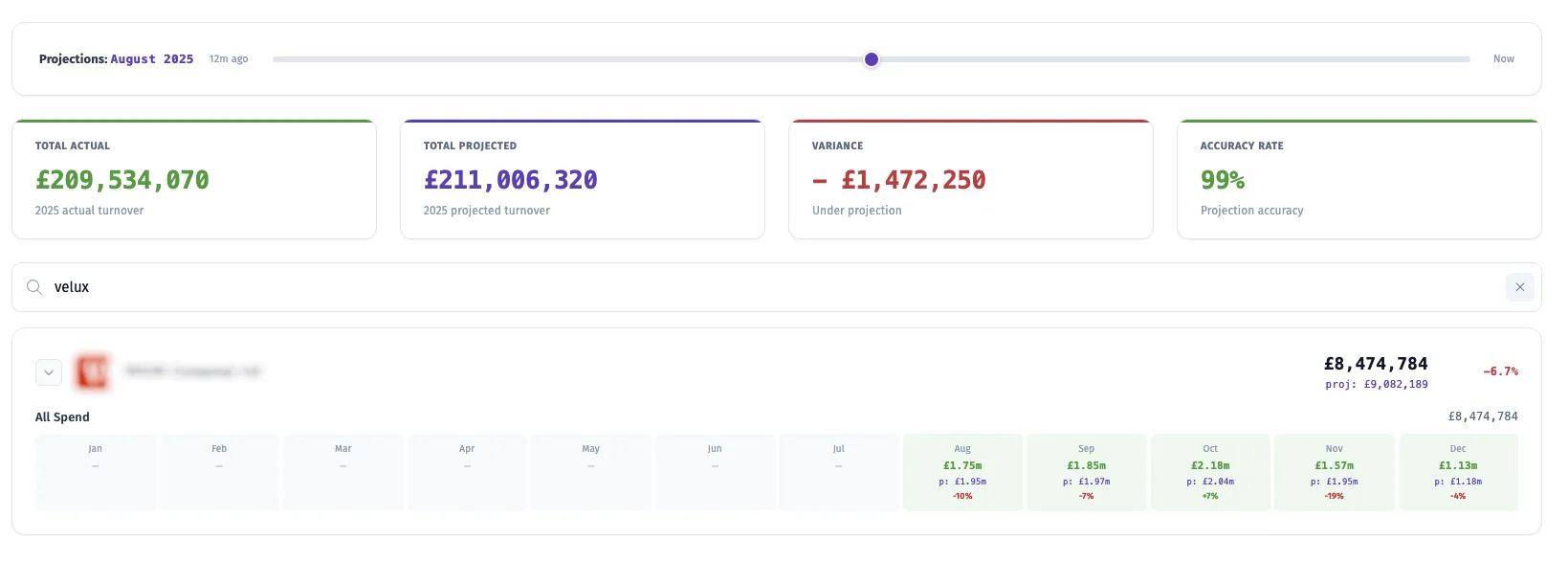
How accurate are the projections? The new analyzer lets you “go back in time” and compare what was projected at any point against what actually happened. View accuracy month-by-month or drill into individual suppliers to investigate discrepancies.
- Compare projected vs. actual turnover at any historical point
- Per-supplier drill-down to pinpoint where variances occurred
- Understand how projections refine over time as new data arrives
- Identify supply, fulfilment, or delivery issues behind discrepancies
Effective Rate Calculation
Not all rebates are straightforward. They can be tiered, compounded, adjusted, or manually created — which means the rate you actually earn may differ from the stated rate.
The new Effective Rate field shows the precise percentage you’re actually earning on every rebate, regardless of how it was calculated. Access it through the Rebate Report Builder or by downloading earnings from the dashboard.
Currency Stream Linking
Some rebates are calculated on non-currency units (e.g. £1.50 per m³). Previously, this made it impossible to calculate an effective rate because there was no link to the currency spend.
Version 3.7 introduces a third stream selector that lets you associate a currency stream with any non-currency rebate calculation — so the system can always compute the true effective rate.
Threats & Opportunity Analysis
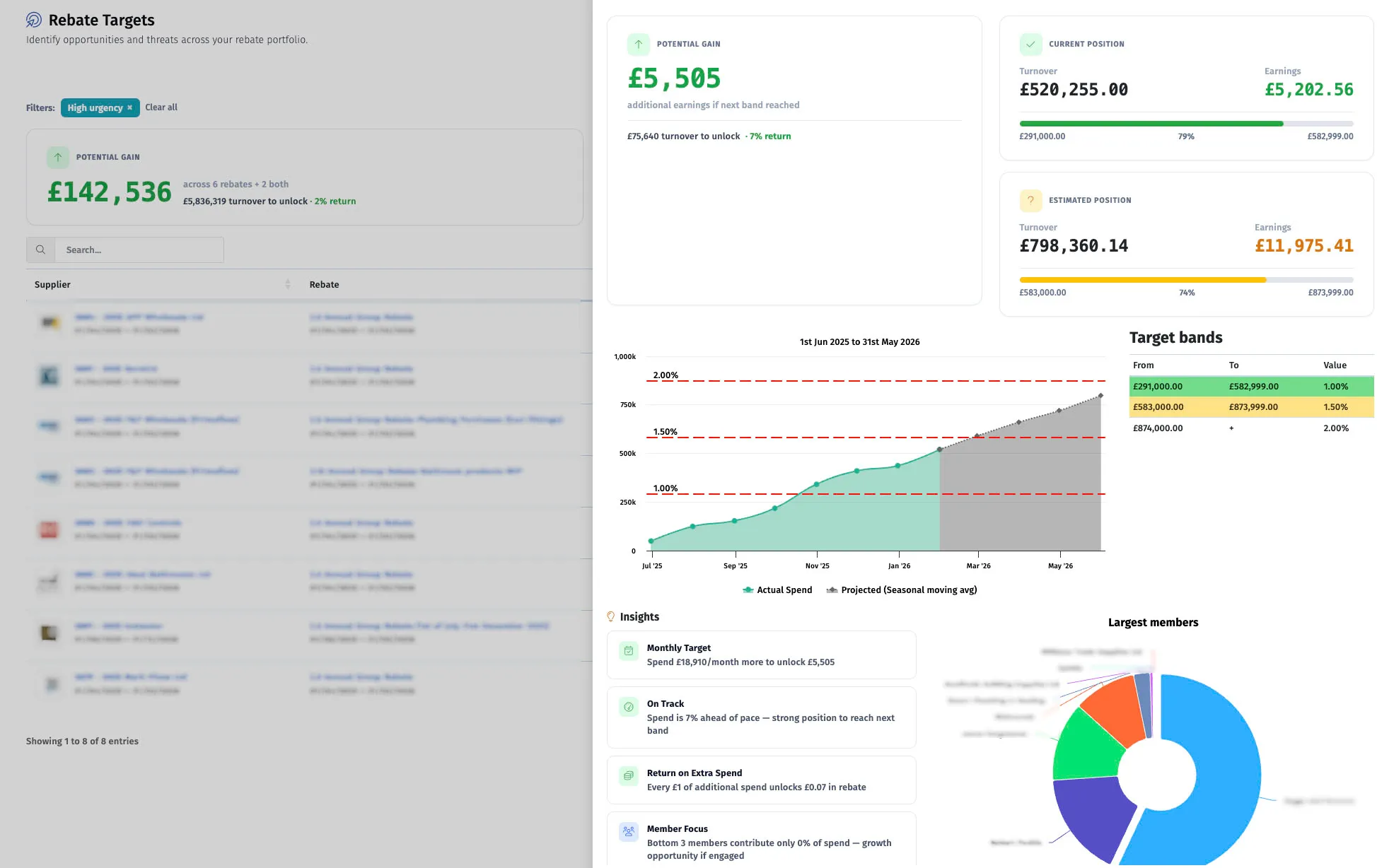
Are you at risk of dropping a rebate band? Or close to reaching the next one? The new Threats & Opportunity Analysis module gives you the answer at a glance.
Every stepped or targeted rebate now includes threat and opportunity scores. Filter by priority to focus on the rebates that need your attention most — whether that’s protecting earnings at risk or pushing to hit the next tier.
- Threat scores show how close you are to dropping a band and the financial impact
- Opportunity scores show how close you are to the next tier and the potential gain
- Priority and urgency ratings help you focus effort where it matters most
- Filter the entire rebate portfolio by threat or opportunity level
Flexible Tag-Based Reporting
Report Builder already lets you analyze spend by merchant, supplier, category, or team. Version 3.7 supercharges it with tag-based filtering at every level — member, supplier, deal, and turnover stream.
- Filter reports by geography (e.g. Scottish merchants only)
- Include or exclude deal types (e.g. solus deals only)
- Filter by turnover stream tags (e.g. include renewables, exclude own-brand)
- Combine multiple tags for truly bespoke reporting
Security & Access Control
Keeping sensitive information secure is critical. Version 3.7 adds fine-grained controls so the right people see the right information — and nothing more.
Secure News & Notifications
Previously, every news story was visible to every merchant user — even stories about restricted deals. Version 3.7 fixes this.
- News stories inherit the same security rules as deals and documents
- Restricted deals automatically generate restricted news notifications
- Users without rebate permissions won’t see rebate-related news
- Applies to both the dashboard and the daily digest email
Flexible Access Date Controls
Managing access for joining and departing members used to mean manually removing permissions — a tedious process, especially for members with 100+ contacts.
Version 3.7 introduces separate Access Start Date and Access End Date fields. Give new members early access so they can familiarise themselves with the platform before they officially join, and automatically cut off access for departing members before their leave date — no manual work required.
Dedicated Task Notifications
Important action items — document approvals, deal reviews, survey requests — used to get buried alongside routine notifications. Not any more.
- Tasks now live in a dedicated tab, separate from standard notifications
- A task can only be dismissed by completing the action (e.g. approving a document)
- No more lost approvals or missed review deadlines
Integrated Support Helpdesk
Version 3.7 brings support ticket management directly into the eBiz platform. View open tickets, track resolution times, and raise new requests — all without leaving the platform.
- View all your support tickets in one place inside eBiz
- See stats: open tickets, tickets raised this week, average resolution time
- Create new tickets by simply emailing helpdesk@ebiz.uk
Ready to get started?
Speak to your account manager to upgrade to eBiz v3.7 today.
ebiz.uk